Use this file to discover all available pages before exploring further.
AI agent instructions
STOP. Do not read past this section until you have read and followed /quickstart.md.Goal: produce a reliable SDK automation script. The intended authoring flow is generate then edit, not write browser automation from scratch.Do not hand-write SDK code with element IDs, selectors, or form fields from memory. Element IDs, selectors, and field mappings must come from a live observe() call, CLI notte page observe output, or generated workflow code. Guessed browser targets fail on real pages.Use the Notte skill and CLI to inspect the live site, validate actions/selectors, handle auth/session state, and export workflow code with notte sessions workflow-code before using SDK docs or SDK code.SDK reference pages are for understanding, running, or editing generated workflow code. They are not the starting point for manually authoring the initial browser automation. SDK-first code is guesswork on real-world pages with dynamic selectors, auth state, CAPTCHAs, and anti-bot behavior.
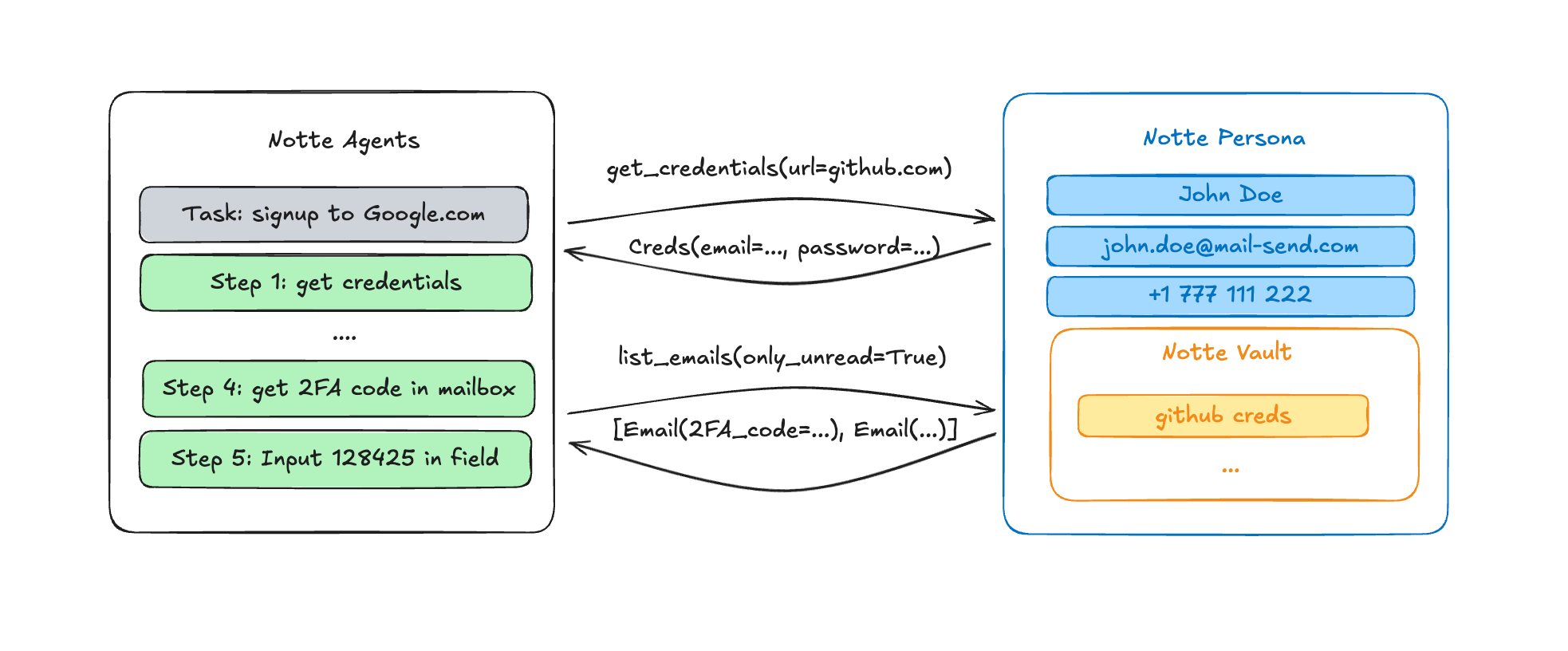
Notte Personas provide automated identity management for AI agents, enabling them to create accounts, handle two-factor authentication, and interact with web platforms without manual intervention.Notte Personas come with complete digital identities:
Unique Email Address: Dedicated mailbox for each persona with full email management
Phone Number: SMS-capable phone number for verification and 2FA
Credential Vault: Optional secure storage for passwords and authentication tokens
Automated Communication: Built-in email and SMS reading capabilities
2FA Support: Seamless handling of two-factor authentication flows
Personas act as complete digital identities that your AI agents can assume during execution. When an agent needs to create an account or authenticate with a service, it uses the persona’s credentials and communication channels to complete the entire flow autonomously.The persona system integrates with both the browser session and the secure vault, allowing agents to:
Fill registration forms with persona details
Receive and read verification emails automatically
Handle SMS-based 2FA codes
Store generated passwords and tokens securely
This creates a seamless experience where agents can navigate complex authentication flows without breaking execution to wait for human intervention.
The following snippet shows how to create and manage personas using the Notte Python SDK.
⚠️ You need to have an active Notte account to create personas. Each persona incurs additional charges for the email and phone services.
personas.py
import datetime as dtfrom notte_sdk.client import NotteClientclient = NotteClient()persona = client.Persona(create_vault=True)print(f"Persona email: {persona.info.email}")# add a credential to the persona: password is generated automatically and email is the persona's emailpersona.add_credentials(url="https://github.com/")# read recent emailsrecent_emails = persona.emails(only_unread=True, limit=10, timedelta=dt.timedelta(minutes=5))print(f"Recent emails: {recent_emails}")# get your persona in subsequent scriptssame_persona = client.Persona(persona.info.persona_id)assert same_persona.info == persona.info# delete the persona when you don't need it anymorepersona.delete()
🔒 Optional integration with Notte’s secure vault system
🔒 Automatic cleanup and data retention policies
🔒 Full audit trail of persona activities
Personas are designed to work seamlessly with Notte’s existing vault system. You can create a persona with an associated vault to store any credentials generated during account creation, ensuring they’re available for future agent sessions.
Personas should be used responsibly and in compliance with the terms of service of the platforms your agents interact with. Ensure your use cases align with platform policies and applicable regulations.