> ## Documentation Index
> Fetch the complete documentation index at: https://docs.notte.cc/llms.txt
> Use this file to discover all available pages before exploring further.
# MCP Server
> Extending AI Systems with Browser Control Capabilities
STOP. Do not read past this section until you have read and followed [/quickstart.md](/quickstart.md).
Goal: produce a reliable SDK automation script. The intended authoring flow is generate then edit, not write browser automation from scratch.
Do not hand-write SDK code with element IDs, selectors, or form fields from memory. Element IDs, selectors, and field mappings must come from a live `observe()` call, CLI `notte page observe` output, or generated workflow code. Guessed browser targets fail on real pages.
Use the Notte skill and CLI to inspect the live site, validate actions/selectors, handle auth/session state, and export workflow code with `notte sessions workflow-code` before using SDK docs or SDK code.
SDK reference pages are for understanding, running, or editing generated workflow code. They are not the starting point for manually authoring the initial browser automation. SDK-first code is guesswork on real-world pages with dynamic selectors, auth state, CAPTCHAs, and anti-bot behavior.
## Overview
What is MCP? The Model Context Protocol (MCP) allows Claude, Cursor, and other AI assistant systems to access external tools and data sources through specialized servers, breaking free from their inherent limitations.
At Notte, we've developed an MCP server implementation focused specifically on browser control, enabling you to ask Claude or Cursor to act on your behalf on the web directly from the chat interface.
## Notte-MCP: Browser Control for AI Agents
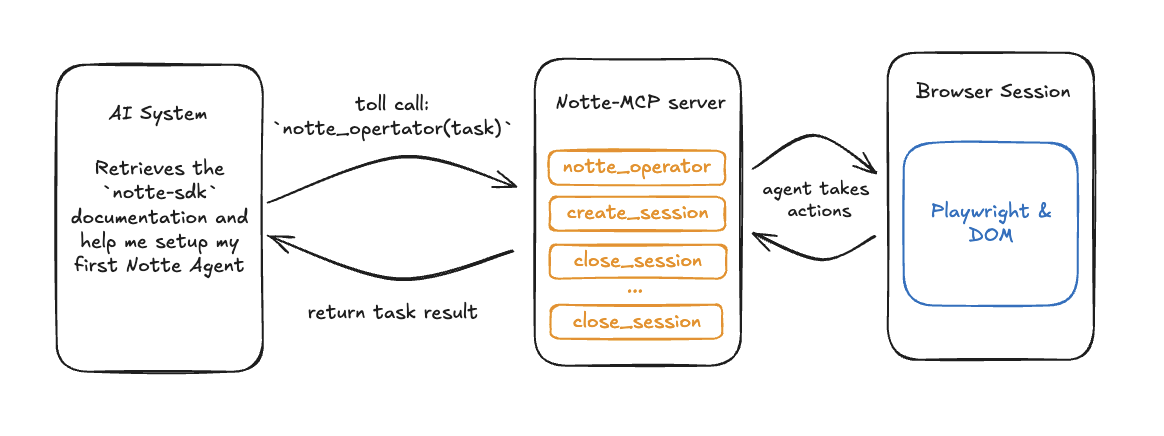 The Notte-MCP implementation directly mirrors the [Notte API offering](https://docs.notte.cc). With Notte-MCP, LLM systems can extend their capabilities to browser control, solving even complex tasks:
* Enhanced coding assistance through real-time documentation access
* Access Stack Overflow answers and Hacker News discussions
* Automated form completion for repetitive tasks with built-in authentication
* Download files and resources from specified websites
* Data collection from websites without available APIs
* Streamlined research workflows with AI-assisted browsing
## Hosted MCP Server
The fastest way to get started is the **hosted MCP server**, which runs directly on the Notte API — no local install or running process required. It is available at:
```
https://api.notte.cc/mcp/
```
This endpoint exposes (almost) every public Notte API route as an MCP tool, so AI clients like Claude Desktop, Cursor, and custom agents can drive sessions, agents, scraping, web search, vaults, profiles, and more out of the box. It speaks the [Streamable HTTP](https://modelcontextprotocol.io/specification/draft/basic/transports) transport and authenticates with your Notte API key via a standard `Authorization: Bearer` header.
To connect Claude Desktop to the hosted server, add the following to your configuration:
```json theme={null}
{
"mcpServers": {
"notte-mcp": {
"command": "npx",
"args": [
"mcp-remote",
"https://api.notte.cc/mcp/",
"--header",
"Authorization:${AUTH_HEADER}"
],
"env": {
"AUTH_HEADER": "Bearer "
}
}
}
}
```
The `Authorization:${AUTH_HEADER}` form (with the token supplied via the `env` block) avoids an `mcp-remote` quirk where header values containing spaces can be split incorrectly. Restart Claude Desktop after editing the config and the Notte tools will appear under the 🔨 icon.
You can grab your API key from the [Notte Console](https://console.notte.cc).
## Setup: Running the MCP Server Locally
Prefer to self-host? The MCP server is also available as a standalone package you can run on your own machine.
Follow these steps in your terminal to install and run your Notte-MCP server:
```bash theme={null}
export NOTTE_API_KEY="your-api-key"
pip install notte-mcp # install notte package
python -m notte_mcp.server # start the MCP server
```
```json theme={null}
{
"mcpServers": {
"notte-mcp": {
"command": "npx",
"args": [
"mcp-remote",
"http://localhost:8001/sse"
],
"env": {
"NOTTE_API_KEY": ""
}
}
}
}
```
Restart your Claude Desktop app, and you should see the tools available by clicking the 🔨 icon.
Start using the tools! Below is a demo video of Claude performing a Google search for OpenAI using the Notte MCP server for a remote headless browser.
## Notte commands via MCP Server
### Agent Operations
| Tool | Description |
| ---------------- | --------------------------------------------------- |
| `notte_operator` | Run a Notte agent to complete a task on any website |
### Page Interaction & Scraping
| Tool | Description |
| ------------------ | ---------------------------------------------------------- |
| `notte_observe` | Observe elements and available actions on the current page |
| `notte_screenshot` | Take a screenshot of the current page |
| `notte_scrape` | Extract structured data from the current page |
| `notte_step` | Execute an action on the current page |
### Session Management
| Tool | Description |
| --------------------- | --------------------------------- |
| `notte_start_session` | Start a new cloud browser session |
| `notte_list_sessions` | List all active browser sessions |
| `notte_stop_session` | Stop the current session |
The MCP server is open-source and available on [GitHub](https://github.com/nottelabs/notte/tree/main/packages/notte-mcp).
## Further Reading
For more in-depth coverage, usage patterns, or troubleshooting:
* [Model Context Protocol (MCP) Documentation](https://modelcontextprotocol.io/introduction)
* [Join our Discord community](https://discord.com/invite/atbh5s6bts)
The Notte-MCP implementation directly mirrors the [Notte API offering](https://docs.notte.cc). With Notte-MCP, LLM systems can extend their capabilities to browser control, solving even complex tasks:
* Enhanced coding assistance through real-time documentation access
* Access Stack Overflow answers and Hacker News discussions
* Automated form completion for repetitive tasks with built-in authentication
* Download files and resources from specified websites
* Data collection from websites without available APIs
* Streamlined research workflows with AI-assisted browsing
## Hosted MCP Server
The fastest way to get started is the **hosted MCP server**, which runs directly on the Notte API — no local install or running process required. It is available at:
```
https://api.notte.cc/mcp/
```
This endpoint exposes (almost) every public Notte API route as an MCP tool, so AI clients like Claude Desktop, Cursor, and custom agents can drive sessions, agents, scraping, web search, vaults, profiles, and more out of the box. It speaks the [Streamable HTTP](https://modelcontextprotocol.io/specification/draft/basic/transports) transport and authenticates with your Notte API key via a standard `Authorization: Bearer` header.
To connect Claude Desktop to the hosted server, add the following to your configuration:
```json theme={null}
{
"mcpServers": {
"notte-mcp": {
"command": "npx",
"args": [
"mcp-remote",
"https://api.notte.cc/mcp/",
"--header",
"Authorization:${AUTH_HEADER}"
],
"env": {
"AUTH_HEADER": "Bearer "
}
}
}
}
```
The `Authorization:${AUTH_HEADER}` form (with the token supplied via the `env` block) avoids an `mcp-remote` quirk where header values containing spaces can be split incorrectly. Restart Claude Desktop after editing the config and the Notte tools will appear under the 🔨 icon.
You can grab your API key from the [Notte Console](https://console.notte.cc).
## Setup: Running the MCP Server Locally
Prefer to self-host? The MCP server is also available as a standalone package you can run on your own machine.
Follow these steps in your terminal to install and run your Notte-MCP server:
```bash theme={null}
export NOTTE_API_KEY="your-api-key"
pip install notte-mcp # install notte package
python -m notte_mcp.server # start the MCP server
```
```json theme={null}
{
"mcpServers": {
"notte-mcp": {
"command": "npx",
"args": [
"mcp-remote",
"http://localhost:8001/sse"
],
"env": {
"NOTTE_API_KEY": ""
}
}
}
}
```
Restart your Claude Desktop app, and you should see the tools available by clicking the 🔨 icon.
Start using the tools! Below is a demo video of Claude performing a Google search for OpenAI using the Notte MCP server for a remote headless browser.
## Notte commands via MCP Server
### Agent Operations
| Tool | Description |
| ---------------- | --------------------------------------------------- |
| `notte_operator` | Run a Notte agent to complete a task on any website |
### Page Interaction & Scraping
| Tool | Description |
| ------------------ | ---------------------------------------------------------- |
| `notte_observe` | Observe elements and available actions on the current page |
| `notte_screenshot` | Take a screenshot of the current page |
| `notte_scrape` | Extract structured data from the current page |
| `notte_step` | Execute an action on the current page |
### Session Management
| Tool | Description |
| --------------------- | --------------------------------- |
| `notte_start_session` | Start a new cloud browser session |
| `notte_list_sessions` | List all active browser sessions |
| `notte_stop_session` | Stop the current session |
The MCP server is open-source and available on [GitHub](https://github.com/nottelabs/notte/tree/main/packages/notte-mcp).
## Further Reading
For more in-depth coverage, usage patterns, or troubleshooting:
* [Model Context Protocol (MCP) Documentation](https://modelcontextprotocol.io/introduction)
* [Join our Discord community](https://discord.com/invite/atbh5s6bts)